Introduction
The application of AI tools is evolving from simple information searches to deep workflow transformations. This article reveals the key second step in the leap from a 10% efficiency increase to a 50% increase—restructuring workflows through atomic skills. From automating sales client case generation to optimizing PRD documents for product managers, practical cases demonstrate how to achieve a true efficiency revolution with AI without disrupting existing work patterns.

You might wonder: why 50%? And why is it the “second step”?
Rest assured, this is not clickbait. Let me explain and see if it makes sense.
First Step: Using AI as a Search Engine, Achieving About 10% Efficiency Increase
Observe the people around you; most are still at the “first step” of using AI: employing products like Doubao or DeepSeek to replace traditional searches. This step indeed enhances efficiency, but the increase is limited—around 10%.
For example, a salesperson might use Doubao to search for information about a company before a first visit. It returns a structured answer containing basic information, key executives, business scope, and potential challenges—information sourced from various platforms. Compared to searching on Baidu for a long time, a 10% efficiency increase seems reasonable.
However, stopping at the first step is insufficient. The problem is that many people do not know how to take the “next step.”
Third Step (Jumping Ahead): Using OpenClaw as an Intern, Achieving 100% Efficiency Increase but at a Cost
At this point, OpenClaw (also known as “Lobster”) comes into play. Some may not know what it can do, adding to their anxiety; others treat it like an intern, achieving a 100% efficiency increase but incurring significant costs—both economic and time-related.
I prefer to define OpenClaw as the “third step” of using AI: letting it handle daily tasks so you can focus on the more critical 20% of your work.
So, what is the second step?
Second Step: Using Appropriate AI Tools to Deconstruct Your Workflow into Atomic Skills
My definition is: use suitable AI tools to comprehensively deconstruct your workflow into atomic skills.
Why do I suggest this?
From a technological curve perspective: technological progress always transitions from geeks and early adopters to the early majority and mainstream. Currently, using Doubao/DeepSeek for answers has reached the early majority stage; however, “Skills” are still in the early adopter phase, with significant growth potential.
From a human nature perspective: humans are perhaps the most selfish and arrogant species in the world—we are accustomed to our workflows and find it challenging to change in a short time. When AI arrives, our natural inclination is to think about how to embed it into our existing workflows rather than replace them entirely. For the average person, this is currently the most cost-effective approach.
How to Implement This?
I recommend completing three tasks:
Task 1: Optimize Without Changing Your Workflow
First, without changing your existing workflow, re-evaluate and optimize it. Prioritize high-frequency, repetitive, and transactional steps, using AI tools to optimize them to a “simple, user-friendly, and stable” state. Once stabilized, gradually add 1-2 more steps, iterating this process. The further you go, the more challenging it becomes.
For example, a B2B product manager’s core workflow may include: requirement management → prioritizing requirements → product planning → competitive research → customer needs research → designing product solutions → workload assessment → prototyping → writing PRD → review → project management → launch → launch training → writing launch announcements → collecting feedback, etc.
Among these, the most frequent, transactional, and easiest to stabilize are writing requirement documents (PRD) and writing launch announcements. I suggest starting with these two. Once they are stable, consider adding workload assessment and competitive research, followed by product solution design.
I spent about a year completing this phase. Now, all requirement documents and launch announcements are generated automatically by AI, and I only need to manually modify 10%-30% (the smaller the requirement, the less modification needed; the larger the requirement, the more modification required).
You might feel that this optimization isn’t “sexy” enough—are there more thorough methods? Yes.
“Vibe Coding” is a more thorough approach: you only need to describe your requirements in natural language, and AI directly generates and publishes the product, skipping the steps of writing PRDs, designing product solutions, creating prototypes, reviewing, and project management. I have practiced this; for specifics, refer to: One-person team, using AI to write a plugin in 3 days.
However, responsibly speaking, the current applicability of vibe coding is limited, more suited for long-tail, personalized, and less complex projects (like developing a plugin, website, or mini-program). If you are working on commercial products in a mature enterprise, it may not be suitable for you.
Task 2: Choose an AI Tool Suitable for Your Workflow
The market is flooded with AI products, which can be overwhelming. The effectiveness of a tool is more important than its quantity.
If you have a strong technical background, you might try the command-line tool from Claude Code; if you are a complete AI novice, I recommend starting with Coze. The latest version already includes vibe coding, Skills, Agent capabilities, and offers 1500 points daily, enough for you to try it out.
Currently, the tool I find most user-friendly is Trae. Although it may not have the capabilities of Claude Code or Cursor, it fully meets my needs—especially the ability to create custom Agents and Skills. Below, I will provide detailed examples. More importantly, our company has purchased a yearly membership for 649 yuan.
Task 3: Solidify Experience and Methodology into Skills
In the AI era, using experience and methodology appropriately can be a “sharp tool”; otherwise, it becomes “useless.”
Suppose you are a seasoned product manager; you need to have the ability to build standards. For example, define:
- A standard for a good requirement document
- A standard for a good solution
- A priority standard for requirements
- A standard for competitive research
- A standard content for customer case studies
- A PPT template for customer case studies
Once defined, use AI Agents or Skills to template them clearly, ensuring consistency and quality in everyone’s output.
I will share two cases: one for SaaS product managers and one for SaaS sales managers.
Case 1: How to Efficiently Complete 50 Customer Cases Using Skills?
Background: From “Interview-Based Knowledge Base” to “Sales Empowerment”
In November 2025, I initiated an internal knowledge base movement—the “Bright Summit Knowledge Base Movement.” At the project’s inception, the goal was to distill solutions from implementation and customer success experiences through interviews, forming a corporate knowledge case library, and empowering all internal partners through RAG+ assistants.
However, after nearly two months of practice, I found this approach had a low return on investment: collecting and organizing a complete requirement scenario solution took about three days. Coupled with my regular work, I could only gather 3-4 customer cases a month. Moreover, if used solely for internal efficiency, the frequency was low, and the benefits were minimal.
In early 2026, after discussing with team leaders, we adjusted the direction—shifting the knowledge base construction goal towards the sales team. Sales are directly linked to company revenue. If we can serve them well, it will be more beneficial for our ARR (Annual Recurring Revenue)—one of the most critical financial metrics for SaaS companies.
Pain Point: Sales Lacks High-Quality, Usable Customer Cases
After two weeks of research with the sales team, I discovered their most pressing pain point: a lack of comprehensive, stable, high-quality customer cases.
In the SaaS sales process, if you can present signed cases from clients in the same industry during the first visit, the success rate significantly increases—similar to having a portfolio during a job interview.
The current situation is that sales query customer cases through DingTalk AI assistants, which automatically reply with a few customer names and a link to a DingTalk document. The content in the link was last updated in April 2024—entirely based on RAG documents, lacking timeliness, stability, accuracy, and quality.
Breakdown: Three Steps, Three Skills
I broke this pain point down into three steps:
- Precise Query: Enable sales to efficiently and accurately find peer customer cases, rather than a vague, outdated list. For example, when asking for “financial industry customer cases,” it must return: financial industry, signed, high-scale clients.
- High-Quality Information: Allow sales to obtain more complete customer case information, including signing time, purchased modules, basic introduction, digitalization status, management/business characteristics, challenges faced, and solutions, rather than just a customer name.
- One-Click PPT Generation: Convert high-quality customer case information directly into usable PPTs. Sales typically use PPTs to introduce company background, customer cases, product features, and service systems during initial communications. The “one-page case” format is more convenient for retrieval and use.
Why break it into three steps? This is a product thinking approach to problem-solving—each step is addressed by a dedicated Skill, which is what I refer to as “Skills atomic capability.”
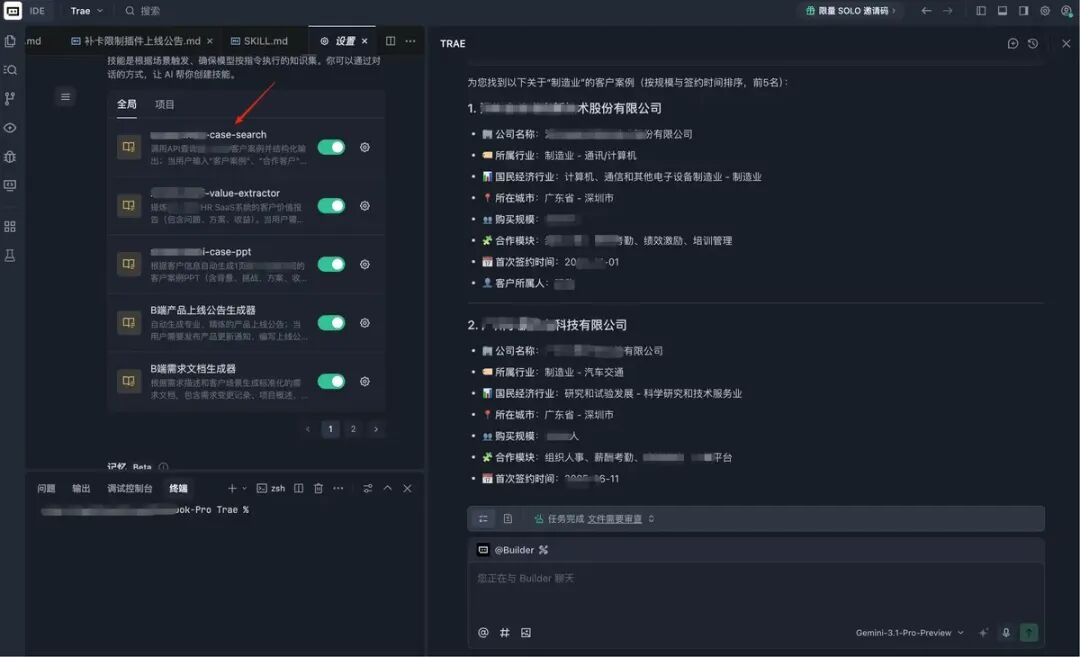
Skill 1: Customer Case Query
Goal: When users need to query customer cases, automatically extract keywords (customer name, city, industry, business, etc.) from natural language and call the backend API to retrieve data, presenting it in structured Markdown format.
Effect Example:
- Input: “Manufacturing industry customers” → Returns 5 manufacturing industry signed customer cases, sorted by scale and signing time in descending order.
- Input: “Beijing education industry customers” → Returns 5 signed customers in the Beijing education industry.
Skill 2: Customer Case Value Extraction
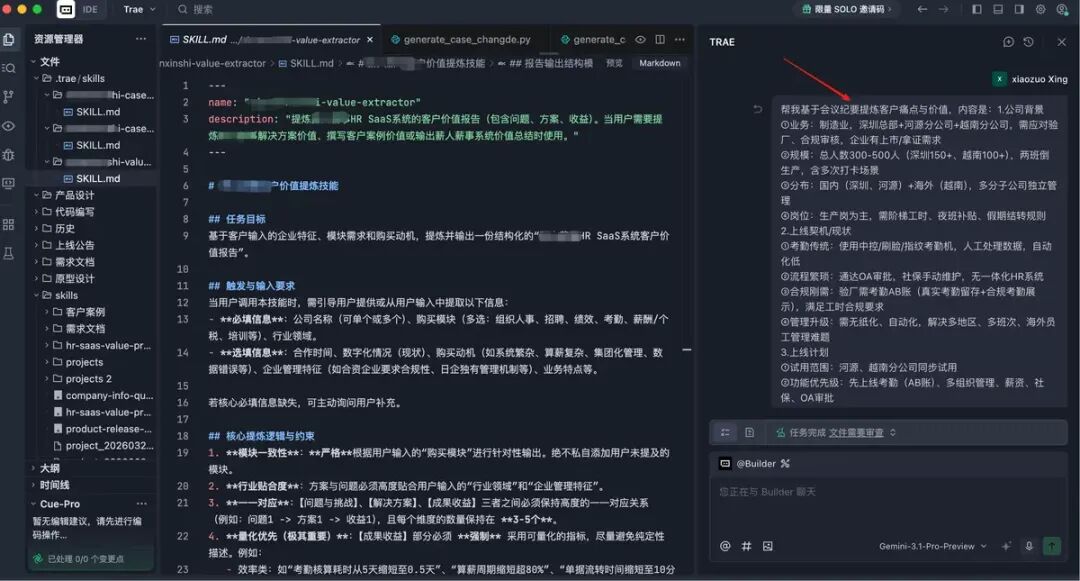
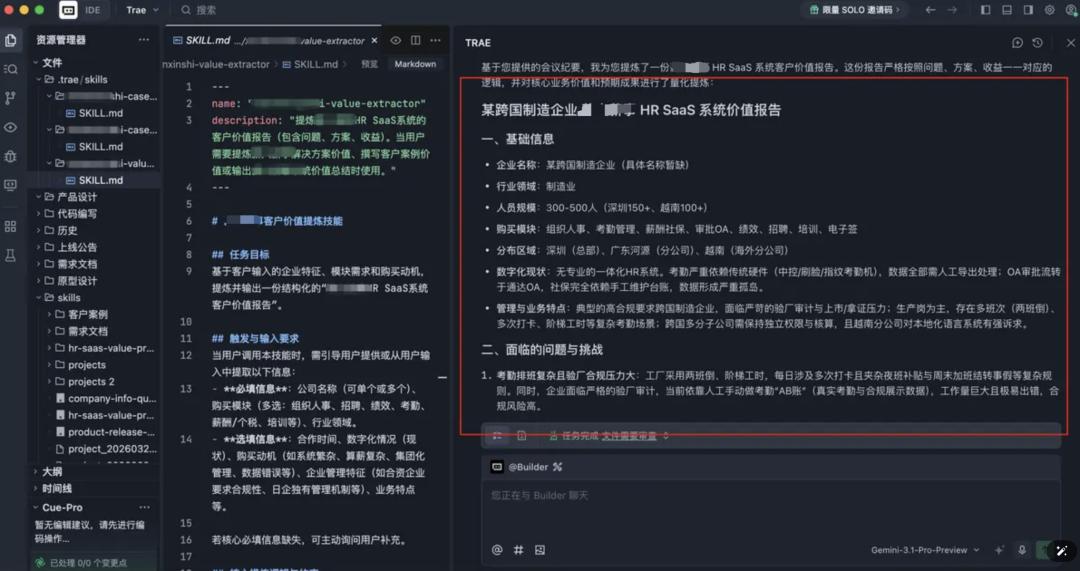
Goal: When sales obtain a customer name, they can fully understand the customer situation and narrate a complete customer story.
This skill organizes various scattered information (meeting minutes, PPTs, casually recorded texts) into a standardized structured document, containing at least four parts:
- Basic information (industry, scale, purchased modules, region, digitalization status, management characteristics)
- Challenges faced (3-5 points)
- Solutions (3-5 points)
- Benefits/results (quantitative indicators)
Skill 3: Customer Case PPT Generation
Goal: With the standardized document from the second step, generate a “one-page” customer case PPT with one click, which sales can directly embed into their complete PPT.
The core of this skill is to automatically capture customer images, logos, introductions, pain points, and solution information, outputting it 100% according to the company’s own PPT template to ensure compliance with external corporate standards.
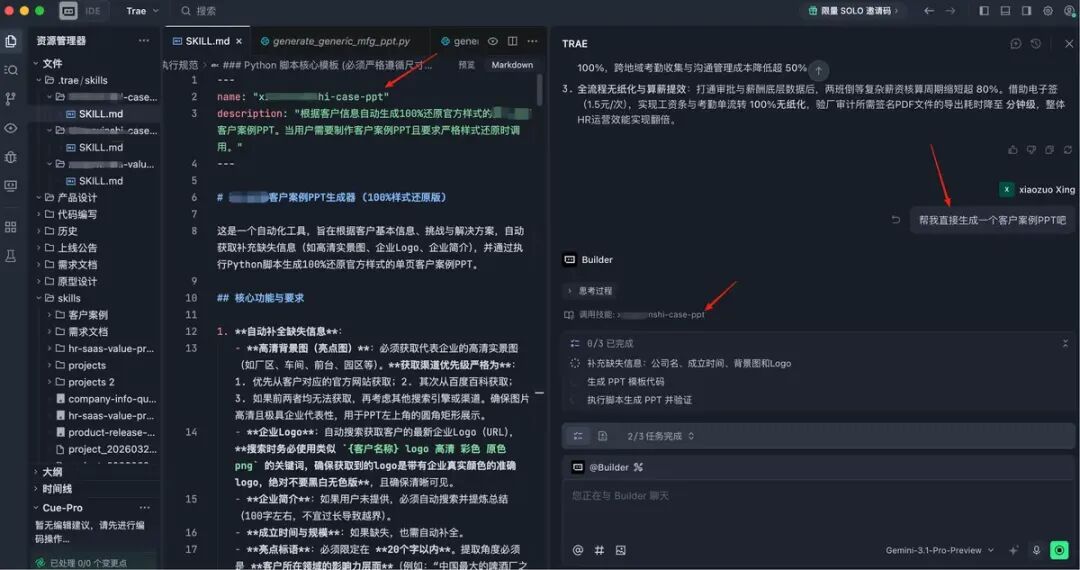
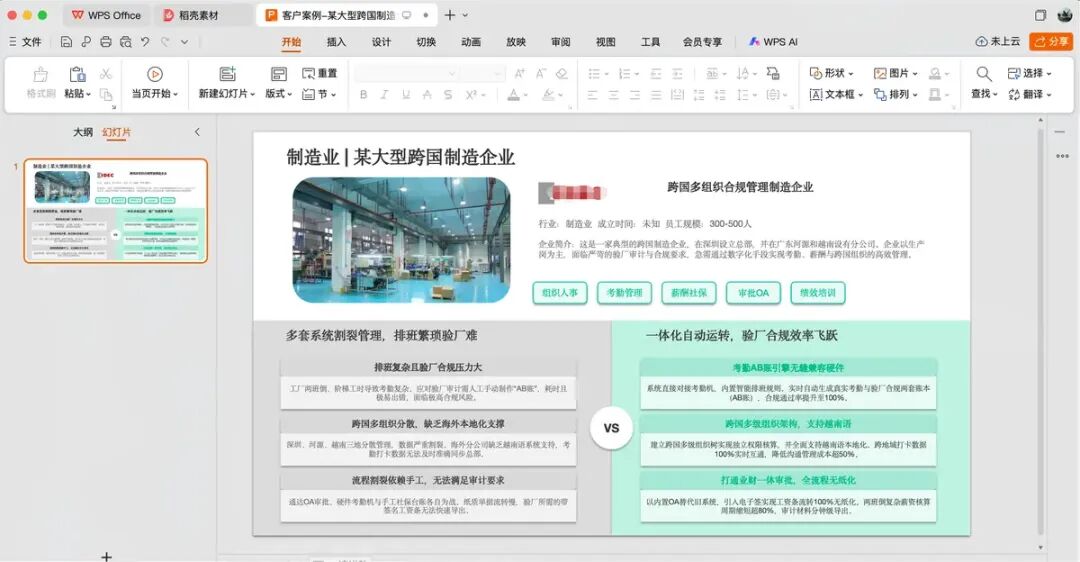
Through these three Skills, we efficiently and accurately completed the output of the first batch of customer cases, doubling the efficiency compared to previous manual methods.
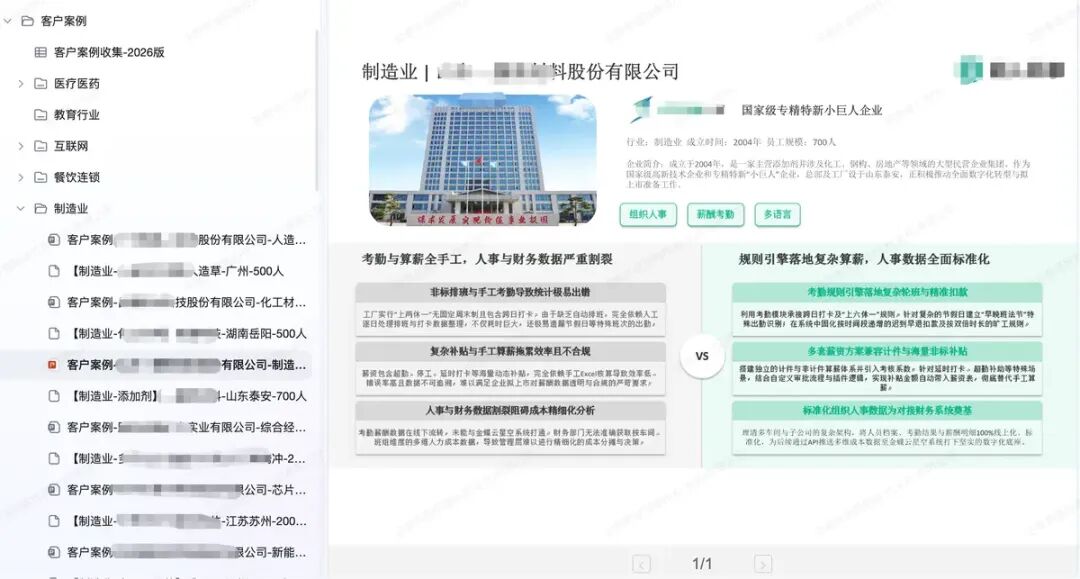
Of course, this project is far from ideal; it is currently in the cold start phase. The initial plan is to complete at least 50 customer cases (20 completed so far), covering 5-8 key industries.
Why can’t it be a one-time solution? Because customers will churn, and new ones will sign. The customer cases we generate may become outdated over time, necessitating periodic reorganization.
Additionally, how do sales obtain the corresponding customer list in the first step? Our solution is to let our self-developed “All in One” product support Skills mode, migrating the Skills I wrote using Trae into it, allowing sales to use our self-developed AI product directly.
The advantage of this model is to create a positive feedback loop:
- Sales submit meeting minutes from customer communications (generated by AI transcription) to MeAI → MeAI automatically supplements and enhances the case library using the corresponding skills.
- Sales can also directly query documents and PPTs from the existing case library.
- Not limited to customer cases, they can also query customer information, truly enhancing sales efficiency rather than just querying “dead data.”
Conclusion
If you are still stuck at the stage of treating AI products as a “search engine” and are unsure how to progress further, consider trying the Skills method shared today.
Its core is simple: without changing your existing workflow, focus on high-frequency, repetitive, standardized experiences and methodologies, forming atomic skills to enhance your work efficiency.
Due to space limitations, today I only discussed customer cases for sales roles. In the next article, I will focus on how product managers can use Skills to improve work efficiency, so stay tuned.
Comments
Discussion is powered by Giscus (GitHub Discussions). Add
repo,repoID,category, andcategoryIDunder[params.comments.giscus]inhugo.tomlusing the values from the Giscus setup tool.